
Artificial Intelligence is no longer something from the future it’s already a part of our daily lives. From writing emails to creating videos, AI tools are helping people save time, work smarter, and even earn money online.
If you’re a student, beginner, or someone exploring technology, you might feel overwhelmed by the number of AI tools available today. The good news? You don’t need to try everything.
In this guide, we’ll walk you through the best free AI tools in 2026 that are easy to use, powerful, and actually useful in real life.
Table Of Contents Best Free Ai Tools 2026
Table of Contents
What Are AI Tools and Why Are They Important?
AI tools are software applications that use artificial intelligence to perform tasks that normally require human effort. These tasks include writing, designing, editing videos, analyzing data, and more.
Why AI Tools Matter Today
- They save time by automating repetitive tasks
- They improve productivity
- They help beginners do professional-level work
- They open new ways to earn money online
For example, a student can use AI to write notes faster, while a content creator can generate videos without expensive equipment.
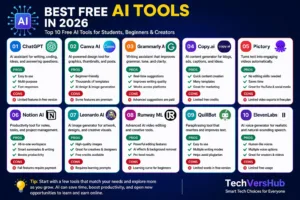
Top 10 Best Free AI Tools in 2026
1. ChatGPT – The All-in-One AI Assistant
ChatGPT is a powerful AI assistant that helps you write content, answer questions, generate ideas, and even solve coding problems. It’s perfect for students, bloggers, and beginners who want quick and smart help in their daily tasks.
If you are just starting with AI, ChatGPT is the best place to begin. It’s like having a smart assistant that can answer questions, write content, generate ideas, and even help with coding.
What You Can Do:
- Write blog posts, emails, and assignments
- Get instant answers to questions
- Generate business ideas
- Learn new skills
Why It’s Great:
ChatGPT is simple to use. You just type your question, and it gives you an answer in seconds.
Pros:
- Easy to use, beginner-friendly
- Multi-purpose (writing, coding, research)
- Fast responses and instant ideas
- Constantly updated
Cons:
- Free version has limited features
- Can give inaccurate answers if prompts are vague
- Cannot replace deep expert knowledge
2. Canva AI – Design Made Easy
Canva AI makes designing easy for everyone. You can create social media posts, thumbnails, presentations, and more using ready-made templates and AI features. It’s ideal for beginners with no design experience.
Designing used to require skills and expensive software. But now, Canva AI makes it possible for anyone to create beautiful graphics.
What You Can Do:
- Create social media posts
- Design YouTube thumbnails
- Make presentations
- Generate AI images
Why It’s Great:
Even beginners can create professional designs within minutes.
Pros:
- Drag-and-drop simplicity
- Thousands of templates and design elements
- AI features for automatic design suggestions
- Great for social media and presentations
Cons:
- Some templates require paid subscription
- Limited advanced editing compared to professional software
3. Grammarly AI – Improve Your Writing Instantly
Grammarly AI improves your writing by fixing grammar mistakes, enhancing clarity, and suggesting better words. It helps you write professionally whether you’re working on emails, assignments, or blog posts.
Writing without mistakes is important, whether it’s an email or a blog post. Grammarly AI helps you write clearly and professionally.
What You Can Do:
- Fix grammar and spelling mistakes
- Improve sentence clarity
- Adjust tone (formal, casual, etc.)
Pros:
- Corrects grammar, spelling, and tone
- Real-time suggestions
- Works across multiple platforms (browser, Word, etc.)
- Improves readability and professional writing
Cons:
- Advanced tone/style features require premium plan
- Sometimes suggests changes that are optional rather than necessary
4. Copy.ai – Content Creation for Marketing
Copy.ai is designed for fast content creation. It helps you generate blog ideas, marketing copy, product descriptions, and social media captions in seconds, saving time and effort.
If you struggle with writing content for marketing or social media, Copy.ai can help.
What You Can Do:
- Generate blog ideas
- Write captions and ads
- Create product descriptions
Pros:
- Generates content fast
- Multiple templates for marketing, blogs, and social media
- Easy for beginners
- Saves time on writer’s block
Cons:
- Free plan has limited monthly credits
- May require editing to make content unique
- Can produce generic suggestions if prompts are vague
5. Pictory – Turn Text into Videos
Pictory allows you to turn text into engaging videos automatically. It’s great for YouTube creators, bloggers, and marketers who want to create videos without editing skills.
Video content is growing fast, and Pictory makes it easy to create videos without editing skills.
What You Can Do:
- Convert blog posts into videos
- Create YouTube content
- Generate short videos
Pros:
- Converts text to video automatically
- Beginner-friendly, no editing skills required
- Suitable for social media and YouTube
- Saves time compared to traditional video editing
Cons:
- Free version has limited exports
- AI-generated visuals may require manual tweaks
- Less control over creative style
6. Notion AI – Smart Productivity Tool
Notion AI combines note-taking and productivity tools with AI features. You can organize tasks, write content, summarize notes, and manage projects efficiently in one place.
Notion AI is perfect for students and professionals who want to stay organized.
What You Can Do:
- Take smart notes
- Summarize content
- Plan tasks and projects
Pros:
- Combines notes, tasks, and AI in one workspace
- Summarizes content and improves productivity
- Flexible templates for personal or team use
- Useful for both students and professionals
Cons:
- Free plan has limited AI features
- Can be overwhelming for beginners due to many options
- Learning curve to unlock full potential
7. Leonardo AI – AI Image Generator
Leonardo AI helps you create high-quality images and digital artwork using simple text prompts. It’s perfect for designers, creators, and anyone who wants unique visuals.
Leonardo AI helps you create stunning visuals and artwork.
What You Can Do:
- Generate images
- Create game assets
- Design creative artwork
Pros:
- Generates high-quality, creative images
- Easy-to-use prompts
- Great for digital art and design
- Offers free credits to start
Cons:
- Learning to write effective prompts takes practice
- Free plan has limited outputs
- Some tools better suited for professionals
8. Runway ML – AI Video Editing
Runway ML offers advanced AI-powered video editing tools. You can remove backgrounds, add effects, and edit videos professionally without complex software.
Runway ML offers advanced video editing features powered by AI.
What You Can Do:
- Edit videos using AI
- Remove backgrounds
- Add effects
Pros:
- Powerful AI-powered video editing tools
- Background removal, special effects, and automation
- Suitable for creators wanting advanced editing
- Supports multiple file formats
Cons:
- Requires practice to master advanced features
- Free version is limited in exports and effects
- Can be slow on large files
9. QuillBot – Paraphrasing Tool
QuillBot helps you rewrite sentences and paragraphs while keeping the original meaning. It’s very useful for students and writers who want to improve clarity and avoid plagiarism.
QuillBot helps you rewrite sentences while keeping the meaning intact.
What You Can Do:
- Rewrite essays
- Improve clarity
- Avoid plagiarism
Pros:
- Rewrites content efficiently
- Maintains meaning while improving clarity
- Multiple modes (formal, creative, simple)
- Helps students and writers avoid plagiarism
Cons:
- Free version has limited characters per use
- AI may alter nuance in some sentences
- Not a replacement for critical writing skills
10. ElevenLabs – AI Voice Generator
ElevenLabs creates realistic human-like voiceovers from text. It’s perfect for YouTube videos, podcasts, and content creators who need high-quality audio without recording their voice.
If you need voiceovers, ElevenLabs is one of the best tools available.
What You Can Do:
- Generate realistic voices
- Create voiceovers for videos
- Convert text to speech
Pros:
- Generates realistic, human-like voices
- Multiple voice options and languages
- Fast and professional quality
- Great for videos, podcasts, and presentations
Cons:
- Free version has limited voice generation
- Some voices sound robotic if prompts are long
- Premium plan needed for advanced features
How to Choose the Right AI Tool
Not every tool is right for everyone. Choose based on your needs:
- Writing → ChatGPT, Grammarly
- Design → Canva AI
- Video → Pictory, Runway
- Productivity → Notion AI
- Images → Leonardo AI
Future of AI Tools
AI is growing very fast. In the coming years, Ai tools will become even smarter and more useful. People who learn AI now will have a big advantage in jobs, business, and online earning.
Conclusion
AI tools are transforming the way we work and learn. The best part is that many of these tools are free and easy to use.
If you’re just starting, don’t try everything at once. Pick a few tools, practice daily, and slowly improve your skills.
With the right approach, AI can help you:
- Save time
- Increase productivity
- Build income streams
FAQs for Best Free AI Tools 2026
1. What are the best free AI tools in 2026?
The best free AI tools in 2026 include ChatGPT, Canva AI, Grammarly, Copy.ai, Pictory, Notion AI, Leonardo AI, Runway ML, QuillBot, and ElevenLabs. These tools help with writing, designing, video creation, productivity, and content generation.
2. Are these AI tools really free?
Most AI tools offer free or freemium versions with limited features. You can start using them without payment, and upgrade to premium for advanced options if needed.
3. Which AI tools are best for students?
Students can benefit from ChatGPT for writing, Grammarly for grammar, Notion AI for notes and organization, and QuillBot for paraphrasing. These tools save time and improve productivity.
4. Can beginners use AI tools easily?
Yes! Most AI tools like ChatGPT, Canva AI, and Pictory are designed for beginners. They have intuitive interfaces and don’t require technical knowledge to get started.
5. Can I earn money using free AI tools?
Absolutely! You can create blogs, videos, social media content, or freelance services using AI tools to generate content faster, increase productivity, and monetize your skills online.
6. Are AI tools safe to use?
Yes, reputable AI tools like ChatGPT, Canva, and Grammarly are safe. However, avoid sharing personal sensitive information in AI platforms to maintain privacy and security.
7. Which AI tools are best for content creators?
Content creators can use Canva AI for design, Pictory and Runway ML for video editing, ChatGPT and Copy.ai for writing, and ElevenLabs for voiceovers.
8. Do I need to pay for full features?
While free versions are functional, premium plans unlock advanced features, more credits, and higher limits. Free plans are ideal for beginners to explore and practice.
9. Are these AI tools updated regularly?
Yes! Most AI tools like ChatGPT, Canva AI, and Grammarly receive regular updates to improve performance, add features, and fix bugs, keeping them relevant and powerful.